
Hi,
I am using 1.4 incubating.
I need to align several span and textfields in a table. What is the best/suggested way to do this?
Thanks,
Mario
Hi,
Could you please describe in more detail what you’re trying ti achieve? Consider attaching code snippets of how you define your view layout and screenshots of what went wrong. It will help with suggesting a solution.
Gleb
Sure!
In this code:
<vbox >
                            <hbox>
                                <span  text="Pass/Fail" />
                                <entityPicker property="passFail" required="true" dataContainer="ricocoDc" id="passFail">
                                    <actions>
                                        <action id="entityLookup" type="entity_lookup"/>
                                        <action id="entityClear" type="entity_clear"/>
                                    </actions>
                                </entityPicker>
                            </hbox>

                            <hbox alignItems="STRETCH" >
                                <span width="100px" />
                                <span id="valore" text="valore" width="100%" />
                                <span id="tolleranza" text="toll" />

                            </hbox>
                            <hbox alignItems="STRETCH">
                                <span width="100px"/>
                                <textField id="nomeField" property="nome" />
                                <textField id="nomeField2" property="nome"/>

                            </hbox>
                            <hbox>
                                <span width="100px" text="foo"/>
                                <textField id="nomeField3" property="nome"/>
                                <textField id="nomeField6" property="nome" />

                            </hbox>
                            <hbox>
                                <span width="100px" text="many bar"/>
                                <textField id="nomeField4" property="nome" />
                                <textField id="nomeField5" property="nome" />
                            </hbox>
                        </vbox>
I need to have:
- span with id “valore” vertically aligned to “nomeField” and “nomefield3” textField
- span with id “tolleranza” vertically aligned to “nomeField2” and “nomefield6” textField
- I would like to avoid width=“100px” in spans
Like in a table
Thanks,
Mario
Set alignItems="CENTER" for the parent container
I have tried center but it does not seem “vertically aligned” to me:
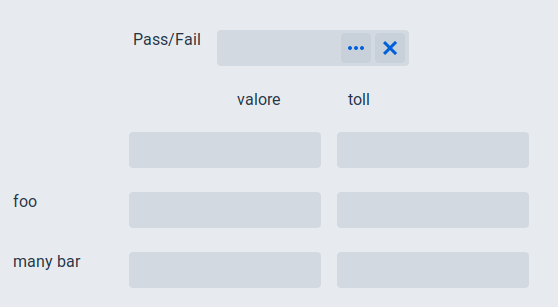
Works for me
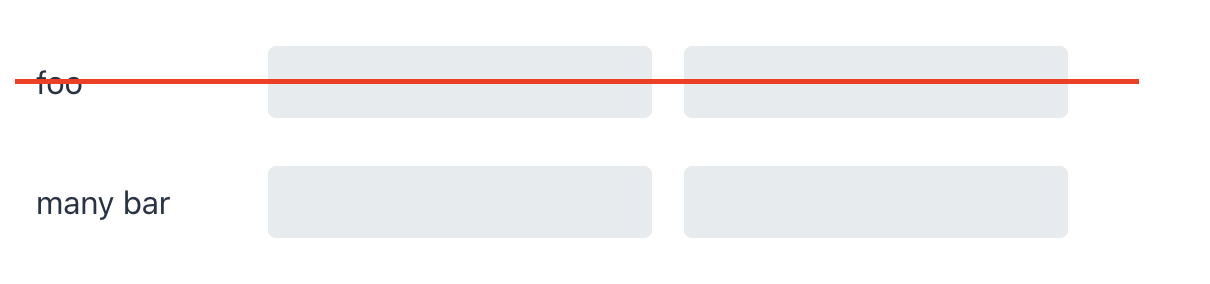
<hbox alignItems="CENTER">
    <span width="100px" text="foo"/>
    <textField id="nomeField3"/>
    <textField id="nomeField6"/>

</hbox>
No no is a language barrier problem.
I attach an image, I need a table layout with items vertically aligned.
And I do not want to use absolute values like “100px”
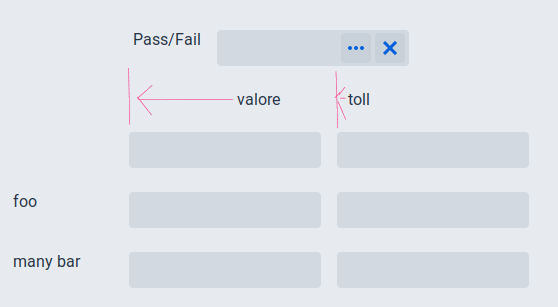
You’re adding components row by row. I’d recommend adding them column by column, seems that it’ll be easier to layout components in a way you want.
If I align them column by column I have the same problem: “foo” and “many bar” are not aligned to textwidgets.
I will not send you a photo, because it is the same problem
So I need to know:
- if there is a table component I am missing
- if I am forced to generate a custom css and, in this case, where should I put it
Thanks,
Mario
The only table component is DataGrid that is intended to display data, i.e. it is not a layout component.
Every project contains a folder: frontend/themes/<themename>. This folder contains at least styles.css as an entry point to add custom styles.
This works!
<vbox alignItems="STRETCH">
                            <hbox>
                                <span  text="Pass/Fail" />
                                <entityPicker property="passFail" required="true" dataContainer="ricocoDc" id="passFail">
                                    <actions>
                                        <action id="entityLookup" type="entity_lookup"/>
                                        <action id="entityClear" type="entity_clear"/>
                                    </actions>
                                </entityPicker>
                            </hbox>

                            <hbox  >
                                <span width="20%" />
                                <span id="valore" text="valore" width="40%" />
                                <span id="tolleranza" text="toll" width="40%" />

                            </hbox>
                            <hbox >
                                <span width="20%" />
                                <textField id="nomeField" property="nome" width="40%" />
                                <textField id="nomeField2" property="nome" width="40%" />

                            </hbox>
                            <hbox>
                                <span width="20%" text="foo"/>
                                <textField id="nomeField3" property="nome" width="40%" />
                                <textField id="nomeField6" property="nome" width="40%" />

                            </hbox>
                            <hbox>
                                <span width="20%" text="many bar"/>
                                <textField id="nomeField4" property="nome" width="40%"/>
                                <textField id="nomeField5" property="nome" width="40%"/>
                            </hbox>
                        </vbox>
                    </hbox>