When using an Entity Data Task to create a new record/item there is a parameter (io.jmix.bpm.entity.FileDescription) with the needed FileRef data for the Data Entity (io.jmix.core.FileRef), but when setting it directly it gives an error:
ClassCastException: class io.jmix.bpm.entity.FileDescription cannot be cast to class io.jmix.core.FileRef (io.jmix.bpm.entity.FileDescription and io.jmix.core.FileRef are in unnamed module of loader ‘app’)
Could you please help me to transform the value appropriately or use whatever other solution you could offer please?
Hello,
Can you describe your data model with more detail and explane what ?
Like Entity A with field FileRef named fileRefField, we put FileDescription into process variables, etc
Or create demo project.
I cannot catch whole your problem, but seems like you trying to assigne some entity’s FileRef field from FileDescription, but without details i cant suggest you a solution.
As i understood you
You have EntityA, which should be created inside EntityDataTask.
Created entity EntityA has FileRef field, i will name it “fileRefField”, probably is required
You trying to fill fileRefField from processVariable??
But when you trying to fill fileRefField from bpm, it throws exceptions because processVariable has type FileDescription, but your entity’s field has type FileRef?
UPD:
If your problem still not solved, i can offer you check this topic. In short, you need just transformFileDescription into FileRef as i said before.
Steps:
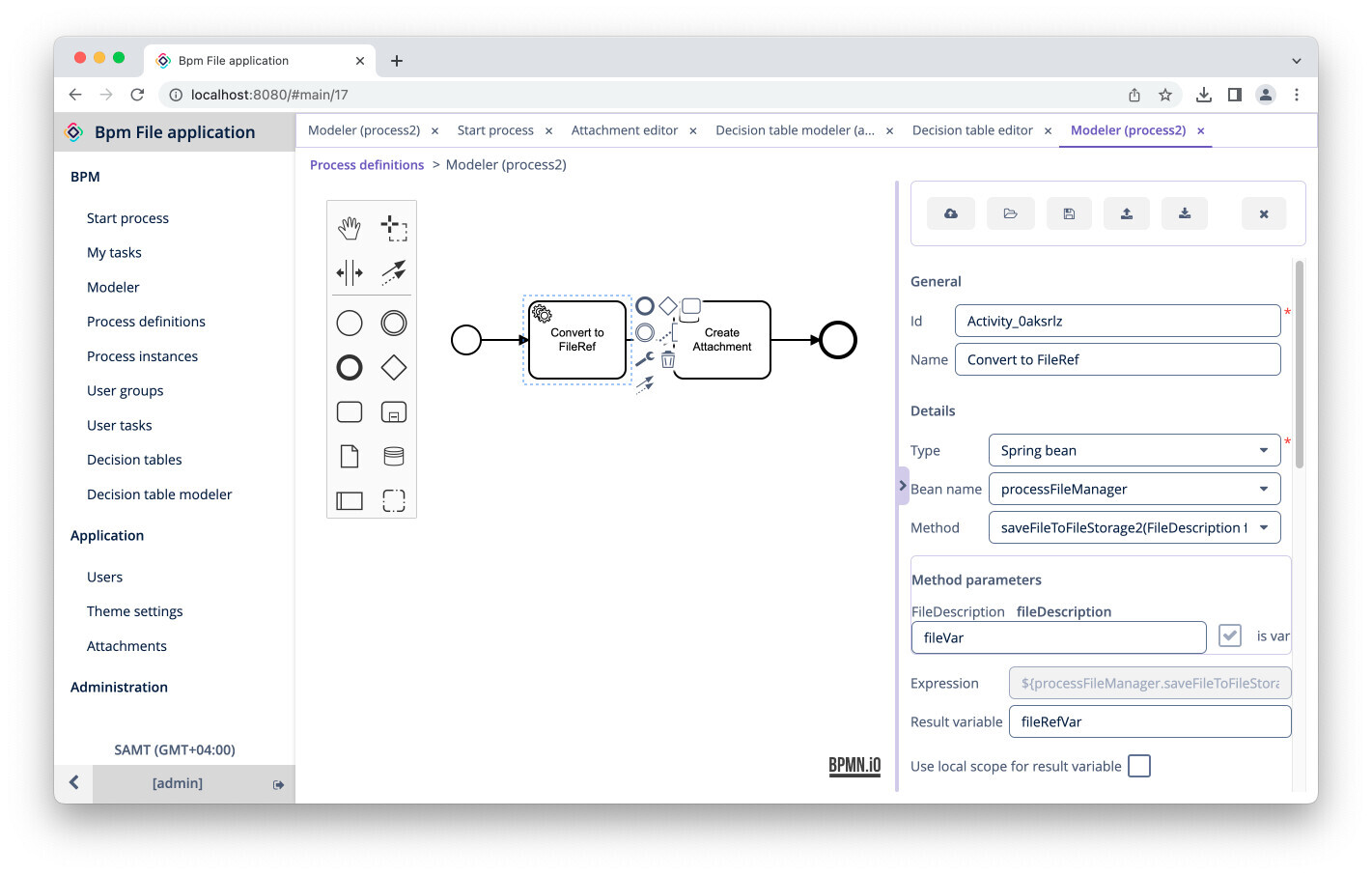
Add service task with SpringBean type before EntityDataTask
Extract your FileDescription and transform it inside spring bean
import io.jmix.bpm.entity.FileDescription;
import io.jmix.core.FileRef;
import io.jmix.core.FileStorage;
import org.springframework.stereotype.Component;

import java.io.ByteArrayInputStream;
import java.io.IOException;
import java.io.InputStream;

@Component
 public class ProcessFileManager {

    private FileStorage fileStorage;

    public ProcessFileManager(FileStorage fileStorage) {
        this.fileStorage = fileStorage;
    }

    public FileRef saveFileToFileStorage2(FileDescription fileDescription) throws IOException {
         try (InputStream is = new ByteArrayInputStream(fileDescription.getFileContent())) {
            FileRef fileRef = fileStorage.saveStream(fileDescription.getFileName(), is);
            return fileRef;
        }
    }
}
Put into service task’s method argument your FileDescription (named fileVar and marked as process variable)
PublishServiceTaskresult as process variable (named fileRefVar in screenshot)
As i said, you just need to transform FileDescription into FileRef.
Use your new FileRef by process variable named fileRefVar
Otherwise, you can use ServiceTask inside of EntityDataTask and taransoform and create necessary Entity insidea SpringBean manually to prevent bpmn schema complication.
If you need more detail explanation/demo, attach your demo project.