baier
March 7, 2022, 8:04am
1
Hello,
regarding this topic Mainscreen - after login - automatic open screen
But, we got a business request that tells us to implement multiple default screens for individual users.
For example:
User A wants the Customers-Screen,
as defaultScreen.
Is this requirement solved in anyway yet or someone got an idea how to solve the issue?
Kr,
pinyazhin
March 9, 2022, 7:13am
3
Hello,
It can be done via user settings mechanism that is provided by jmix-ui-data-starter:
implementation 'io.jmix.ui:jmix-ui-data-starter'
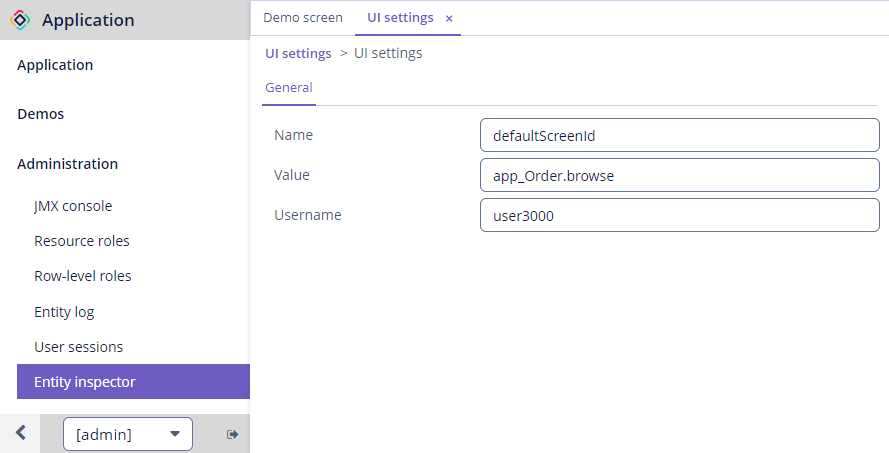
UiSetting entity contains username, setting name and its value. You can create an instance for each user with different screen id and load it in MainScreen.
For instance:
@Autowired
private UserSettingService userSettingService;
@Autowired
private WindowConfig windowConfig;
@Autowired
private Screens screens;
@Autowired
private UiProperties uiProperties;

@Subscribe
public void onAfterShow(AfterShowEvent event) {
    String defaultScreenId = userSettingService.loadSetting("defaultScreenId");
    if (Strings.isNullOrEmpty(defaultScreenId)) {
        screenTools.openDefaultScreen(
                UiControllerUtils.getScreenContext(this).getScreens());
    } else if (windowConfig.hasWindow(defaultScreenId)) {
        Screen screen = screens.create(defaultScreenId, OpenMode.NEW_TAB);
        screen.show();

        Window window = screen.getWindow();
        ((WindowImpl) window).setDefaultScreenWindow(true);
        window.setCloseable(!uiProperties.isDefaultScreenCanBeClosed());
    }
    screenTools.handleRedirect();
}
You can create UiSetting via Entity Inspector screen or implement your own screen for this.
baier
March 16, 2022, 10:13am
5
I appreciate the answer!
I adjusted the code a little bit, to open more than one Tab when logging in:
    public void onAfterShow(AfterShowEvent event) {
            String defaultScreenId = userSettingService.loadSetting("defaultScreenId");

            //Check, if no custom default screen is set in UI Settings.
            if (Strings.isNullOrEmpty(defaultScreenId)) {
                screenTools.openDefaultScreen(
                        UiControllerUtils.getScreenContext(this).getScreens());

                //If it's set, open all windows with comma separated from UI Settings.
            } else {
                List<String> defaultScreens = Arrays.asList(defaultScreenId.split(","));
                Collections.reverse(defaultScreens);
                for (String defaultScreen : defaultScreens) {
                    Screen screen = screens.create(defaultScreen, OpenMode.NEW_TAB);
                    screen.show();

                    Window window = screen.getWindow();
                    ((WindowImpl) window).setDefaultScreenWindow(true);
                    window.setCloseable(uiProperties.isDefaultScreenCanBeClosed());
                }
            }
            screenTools.handleRedirect();
        }