Extending ReportDetailView

Hello,

I want to extend the ReportDetailView to set a default template for the report:

@Route(value = "reports/ext:id", layout = DefaultMainViewParent.class)
@ViewController(id = "ext_report_Report.detail")
@ViewDescriptor(path = "ext-report-detail-view.xml")
public class ExtReportDetailView extends ReportDetailView {

    @Autowired
    private Resources resources;

    @Autowired
    private ReportsProperties reportsProperties;


    @Override
    protected  void onInitEntity(InitEntityEvent<Report> event) {
              super.onInitEntity(event);
              final Report report = event.getEntity();
             // do something
    }
}
<?xml version="1.0" encoding="UTF-8" standalone="no"?>
<view xmlns="http://jmix.io/schema/flowui/view"
      title="msg://io.jmix.reportsflowui.view.report/reportDetailView.title"
      extends="io/jmix/reportsflowui/view/report/report-detail-view.xml"
      messagesGroup="io.jmix.reportsflowui.view.report">
    <layout/>
</view>

When start the appliation and create a new report, I always get an instance of the original ReportDetailView. How can I get him to use ExtReportDetailView for editing?

Greetings
Andreas

Hello,
I think you should override, not extend.
In your case, Report add-on is still referencing the old controller, route and xml descriptor.
It’s calling ReportDetailView and that is using report-detail-view.xml, not the ext one.

If you override, Jmix will know that when Report-addon is calling ReportDetailView it should use yours.

Controller would look like this:

@Route(value = “reports/:id”, layout = DefaultMainViewParent.class)
@ViewController(id = “report_Report.detail”)
@ViewDescriptor(path = “ext-report-detail-view.xml”)
public class ExtReportDetailView extends ReportDetailView {

Same @Route, same @ViewController, copy-paste xml from report-detail-view.xml to ext-report-detail-view.xml - then change that to get a different UI. (That’s what I do, I do not extend xml descriptors)
If modifying the methods, you need to use @Override.

Kind regards,
Mladen

Hello,

Thank you for your reply. Unfortunately, that didn’t work. The Jmix version of ReportDetailView is still being called.

@Route(value = "reports/:id", layout = DefaultMainViewParent.class)
@ViewController("report_Report.detail")
@ViewDescriptor(path = "ext-report-detail-view.xml")
public class ExtReportDetailView extends ReportDetailView {

    @Autowired
    private Resources resources;

    @Autowired
    private ReportsProperties reportsProperties;


    @Override
    protected  void onInitEntity(InitEntityEvent<Report> event) {
        super.onInitEntity(event);
        final Report report = event.getEntity();
        ...

Best regards,
Andreas

Hello,
lets do this step by step then.
I have shared an example Jmix 2.7.2 project here GitHub - mbucan/reportext

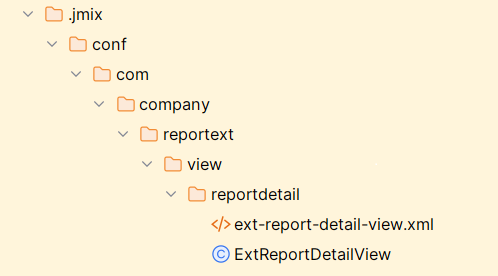
  1. Make sure your jmix/conf directory is empty, sometimes there can be a problem with hotdeploy: an old version of the files will be used and ignore your changes. Maybe this is happening to you, delete everything inside
    image

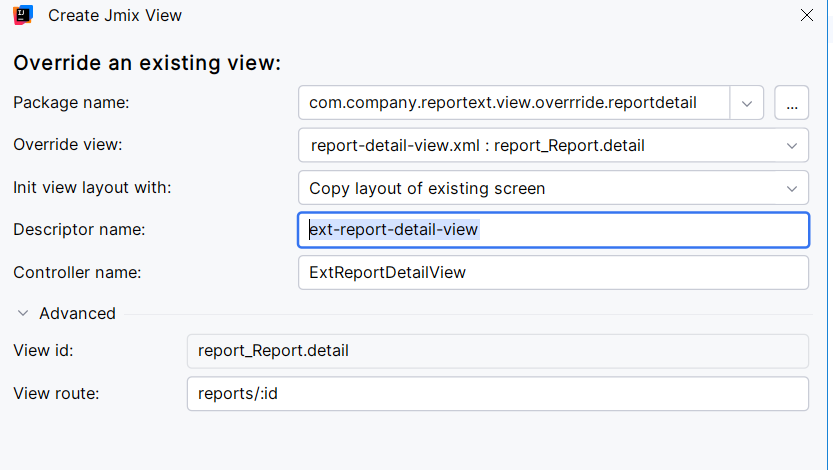
  2. New - View - Override and existing view

  • accept default package, best manage yourself with desired folder - on the picture is override folder, in the project I just accepted default and that would be bad in bigger project
  • Override view: type report_Report, select when found
  • Init view layout with: Copy layout of existing screen - that will basically copy paste the existing xml into a new file
  • Descriptor name: it will offer you ext-report-detail-view , I used ext1, prefix can be anything
  • Controller name: ExtReportDetailView
  • View route: reports/:id
    image
  1. Start making your changes. I have added a new tab with a dummy button as an example.

There is more to overriding with Spring Boot, giving you finer control, using @Primary or registering in @Configuration file, but the given example should work just fine without adding complexity complications.
Kind regards,
Mladen

1 Like