
I have two accounts: coretest@leasing.com and coretestAD@sacombankleasing.com , and both accounts can perform ldapsearch using the manager-dn account configured in the system.
For the coretest@leasing.com account (login successful), when logging into the Jmix system, the LDAP log appears as shown in the image.

and the Jmix log is as follows…

However, for the coretestAD@sacombankleasing.com account (login failed), when logging into the Jmix system, the LDAP log still appears as shown in the image
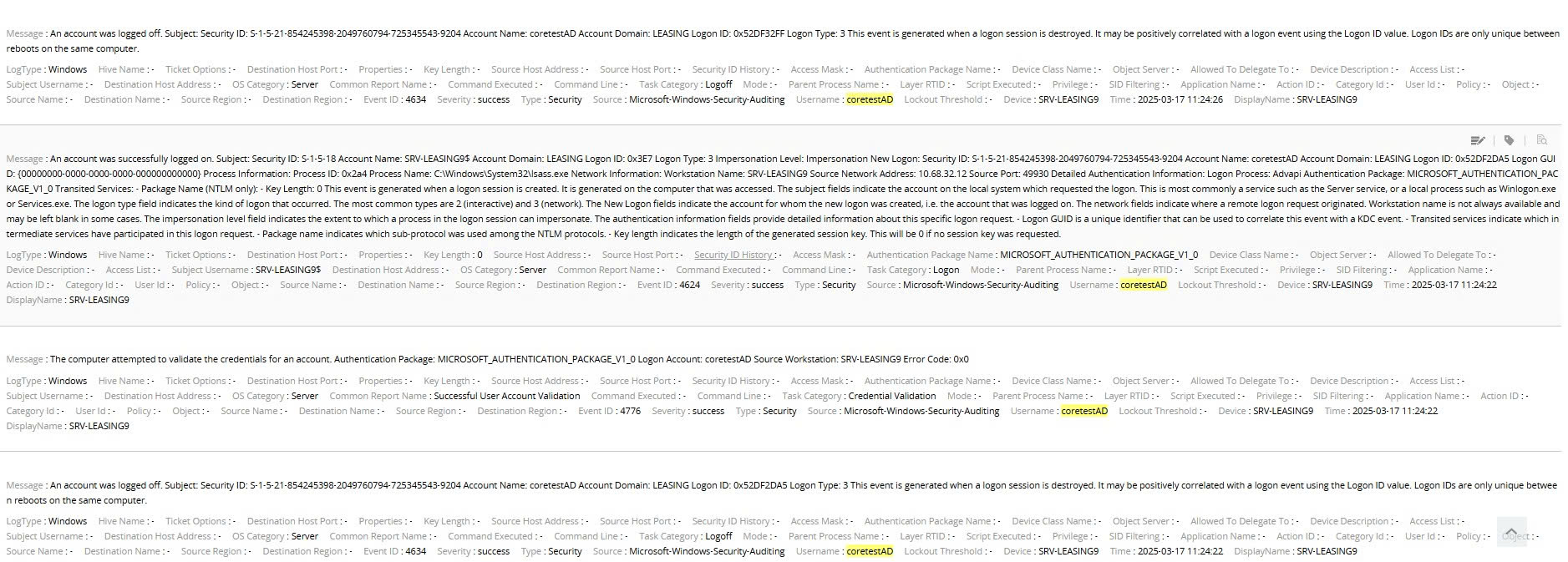
and the Jmix log is as follows…

I am not sure where the issue is and need some help.
i.gavrilov
(Ivan Gavrilov)
March 25, 2025, 8:27am
4
Hi,
Do you use Active Directory?
If so, please check Usage with Active Directory :: Jmix Documentation and adjust your properties accordingly.
Regards,
Ivan
minhdt13889
(Minh Dam Truong)
March 27, 2025, 11:30pm
5
Yes, I have configured AD, and here is my configuration information:
#LDAP
jmix.ldap.enabled = ${LDAP_ENABLED:true}
jmix.ldap.urls = ${LDAP_URLS:ldap://srv-leasing9.leasing.com:389/}
jmix.ldap.base-dn = ${LDAP_BASE_DN:dc=leasing,dc=com}
jmix.ldap.manager-dn = ${LDAP_MANAGER_DN}
jmix.ldap.manager-password = ${LDAP_MANAGER_PASSWORD}
jmix.ldap.use-active-directory-configuration = ${LDAP_ACTIVE_AD:true}
jmix.ldap.user-search-filter = ${LDAP_USER_SEARCH_FILTER:(&(objectCategory=person)(objectClass=user)(userPrincipalName={0}))}
#jmix .ldap.active-directory-domain = ${LDAP_AD_DOMAIN}
jmix.ldap.user-details-source = ${LDAP_USER_DETAIL_SOURCE:app}.
The additional information is that the domain sacombankleasing.com is a UPN suffix, configured in the AD of the DC leasing.com (dc=leasing,dc=com)
i.gavrilov
(Ivan Gavrilov)
April 10, 2025, 10:15am
6
Hi,
Sorry for the late response.
For now it’s hard to say what exaclty is the root cause.
Add debug logging for further investigation:
logging.level.org.springframework.security=DEBUG
logging.level.org.springframework.ldap=DEBUG
Try to add sAMAccountName criteria to you search filter:
(&(objectCategory=person)(objectClass=user)(|(userPrincipalName={0})(sAMAccountName={1})))
And what is your exact version of Jmix?
Regards,
Ivan
minhdt8
(Minh Dam Truong)
June 4, 2025, 10:18am
7
I’m using Jmix 2.5.1. Additional information: the customer’s Active Directory system has a single domain, but it is configured with two UPNs — leasing.com and sacombankleasing.com . Could this be the cause of the issue? In the Jmix documentation I read, it only shows how to configure a single domain.
i.gavrilov
(Ivan Gavrilov)
June 9, 2025, 12:49pm
9
Hi,
Did you managed to get debug logs?
Regards,
Ivan