Hi Emre,
DynamoDB integration is possible in Jmix. It is possible to use the custom data store as you mentioned, but I found it a little problematic since the data access model is quite different. In the custom data store, you would have to find out the intended filtering based on the JPQL query and then apply the filtering in Dynamo terms.
Instead, you can also just use a custom service together with a DTO entity. This solution seems to be quite a bit simpler.
I have prepared an example on how to do that: GitHub - mariodavid/jmix-petclinic-dynamodb: Jmix Example using DynamoDB as a custom data store · GitHub
Jmix - DynamoDB Integration
This example application shows how to integrate a DynamoDB table into a Jmix application.
The example scenario is the following:
For Visits, it is possible to keep a log book of VisitLog entries. Those Log entries should be stored in DynamoDB.
1. Spring Data DynamoDB dependency
There is a Spring Data DynamoDB integration out there, which we can leverage to ease the actual interaction with DynamoDB.
Add the following dependency to your Jmix application:
dependencies {
    // ...
    implementation 'com.github.derjust:spring-data-dynamodb:5.1.0'
}
2. DynamoDB Config
To define the DynamoDB beans that should be used, create a DynamoDBConfig class in your application like this:
@Configuration
@EnableDynamoDBRepositories(basePackageClasses = VisitLogRepository.class)
public class DynamoDBConfig {


	@Primary
	@Bean
	public DynamoDBMapperConfig dynamoDBMapperConfig() {
		return DynamoDBMapperConfig.DEFAULT;
	}

	@Primary
	@Bean
	public DynamoDBMapper dynamoDBMapper(AmazonDynamoDB amazonDynamoDB, DynamoDBMapperConfig config) {
		return new DynamoDBMapper(amazonDynamoDB, config);
	}

	@Primary
	@Bean
	public AmazonDynamoDB amazonDynamoDB() {
		return AmazonDynamoDBClientBuilder.standard()
				.withRegion(Regions.US_EAST_1).build();
	}
}
3. VisitLog DTO entity
Now let’s create a DTO entity for the Visit log. Use the annotation from dynamodb to indicate which table should be used
and which properties are considered to be the hash key:
@DynamoDBTable(tableName = "visit-log")
@JmixEntity(name = "petclinic_VisitLog", annotatedPropertiesOnly = true)
public class VisitLog {

    @JmixProperty
    @JmixGeneratedValue
    @JmixId
    private UUID id;

    @JmixProperty(mandatory = true)
    @NotNull
    private UUID visitId;

    @JmixProperty
    private String title;

    @InstanceName
    @JmixProperty
    private String description;

    @DynamoDBAttribute
    public UUID getVisitId() {
        return visitId;
    }

    public void setVisitId(UUID visitId) {
        this.visitId = visitId;
    }

    @DynamoDBAttribute
    public String getTitle() {
        return title;
    }

    public void setTitle(String title) {
        this.title = title;
    }

    @DynamoDBAttribute
    public String getDescription() {
        return description;
    }

    public void setDescription(String description) {
        this.description = description;
    }

    @DynamoDBHashKey
    @DynamoDBAutoGeneratedKey
    public UUID getId() {
        return id;
    }

    public void setId(UUID id) {
        this.id = id;
    }
}
4. Create Spring Data Repository
Next up we can create our Spring Data repository in order to interact with the table. K
import org.socialsignin.spring.data.dynamodb.repository.EnableScan;
import org.springframework.data.repository.CrudRepository;

@EnableScan
public interface VisitLogRepository extends CrudRepository<VisitLog, UUID> {

    List<VisitLog> findByVisitId(UUID visitId);
}
It is necessary to not let the Jmix Spring Data integration interfere with the DynamoDB Spring Data repositories.
We can achieve that by limiting the JmixDataRepositories to the subpackage: repository. The VisitLogRepository is not located
in this package. With that it will not be recognised by the Jmix Spring Data implementation.
@EnableJmixDataRepositories("io.jmix.petclinic.repository")
public class JmixPetclinicApplication {

}
To activate the VisitLogRepository, we need to annotate our DynamoDBConfig to enable scanning and mention VisitLogRepository class:
@EnableDynamoDBRepositories(basePackageClasses = VisitLogRepository.class)
public class DynamoDBConfig {
    // ...
}
5. Use Repository in application Code
For easier integration additional we can create a VisitLogService, that acts as the logic layer for interacting with the Table:
@Component("petclinic_VisitLogService")
public class VisitLogService {

    @Autowired
    VisitLogRepository visitLogRepository;

    public List<VisitLog> findByVisit(Visit visit) {
        return visitLogRepository.findByVisitId(visit.getId());
    }

    public void saveLogEntry(VisitLog visitLog) {
        visitLogRepository.save(visitLog);
    }
}
6. Integrate with Jmix UI
Show Visit Log Entries
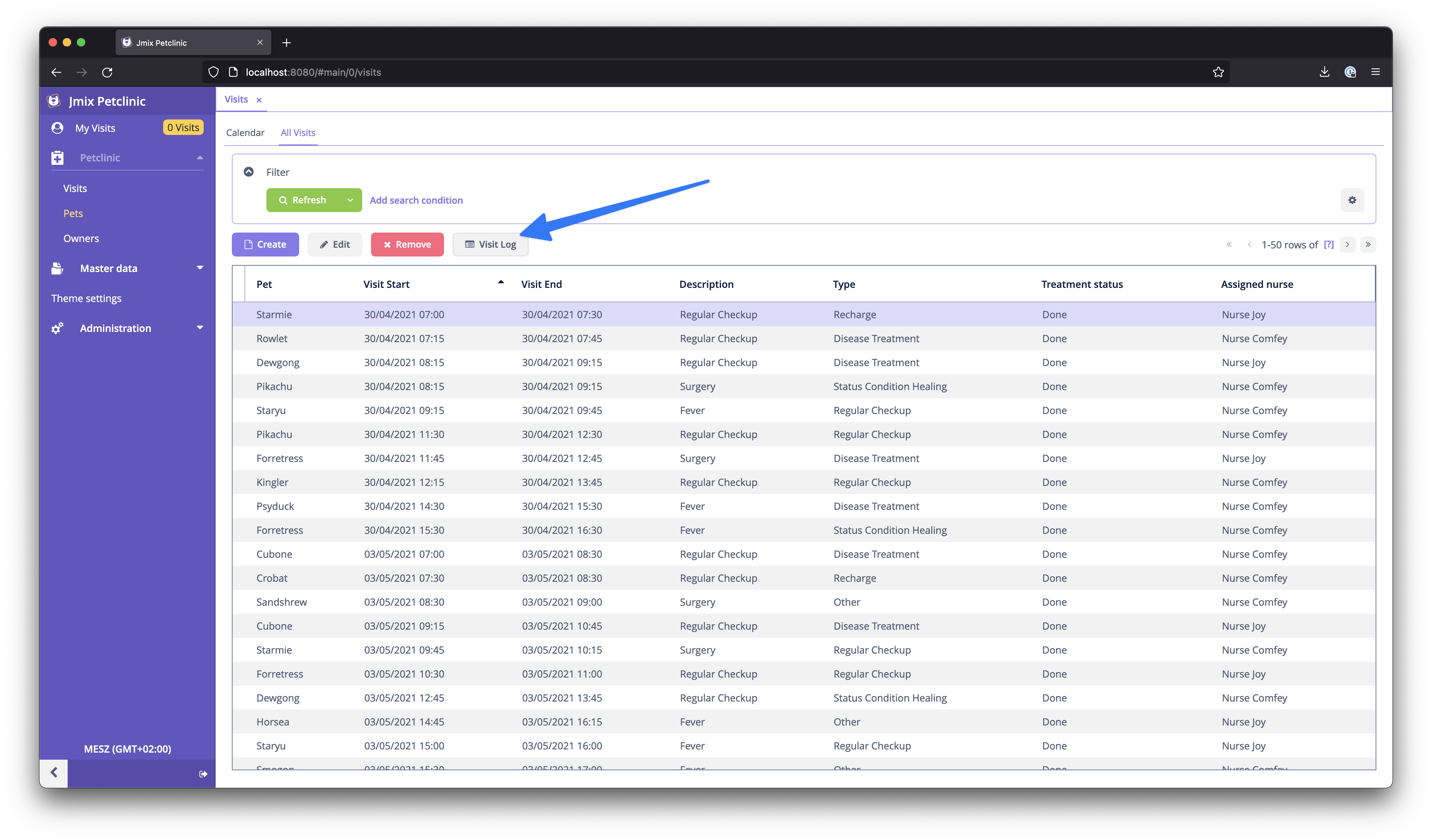
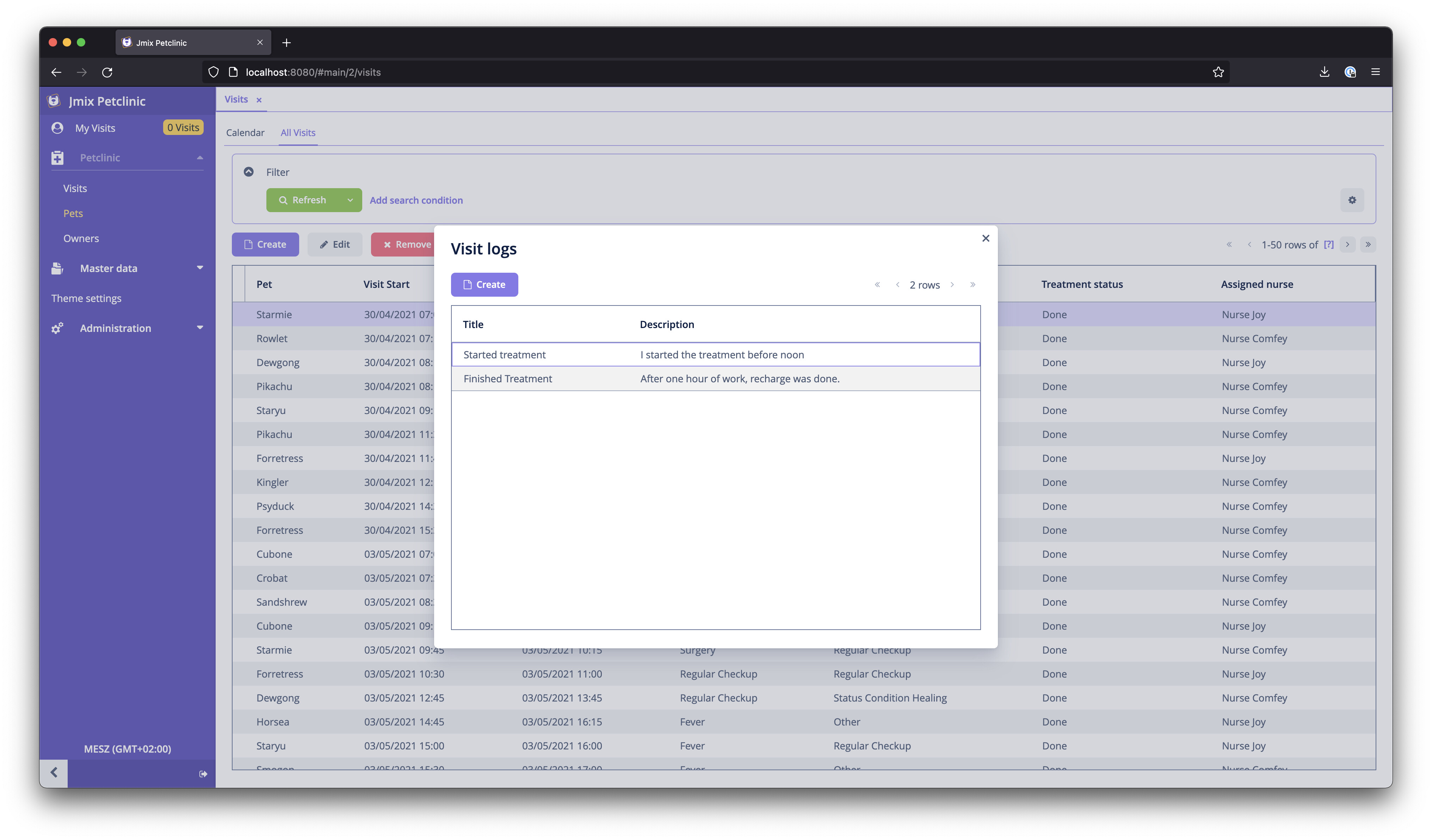
Now it is possible to use the new DTO entity in our application. It is possible to generate Screens for the DTO entity.
In this example you will find the VisitLogBrowse and VisitLogEditor accordingly.
The browse screen loads the entites via the Service during initialization of the screen:
public class VisitLogBrowse extends StandardLookup<VisitLog> {

    private Visit visit;
    @Autowired
    private CollectionContainer<VisitLog> visitLogsDc;
    @Autowired
    private VisitLogService visitLogService;
    @Autowired
    private Metadata metadata;

    @Subscribe
    public void onBeforeShow(BeforeShowEvent event) {
        visitLogsDc.setItems(
            visitLogService.findByVisit(visit)
        );
    }
}
The visit parameter is passed in by the VisitBrowse screen, where this screen is called from. The setItems method sets
the values into the data container and utilises the VisitLogService for loading the data.
Create Visit Log Entries
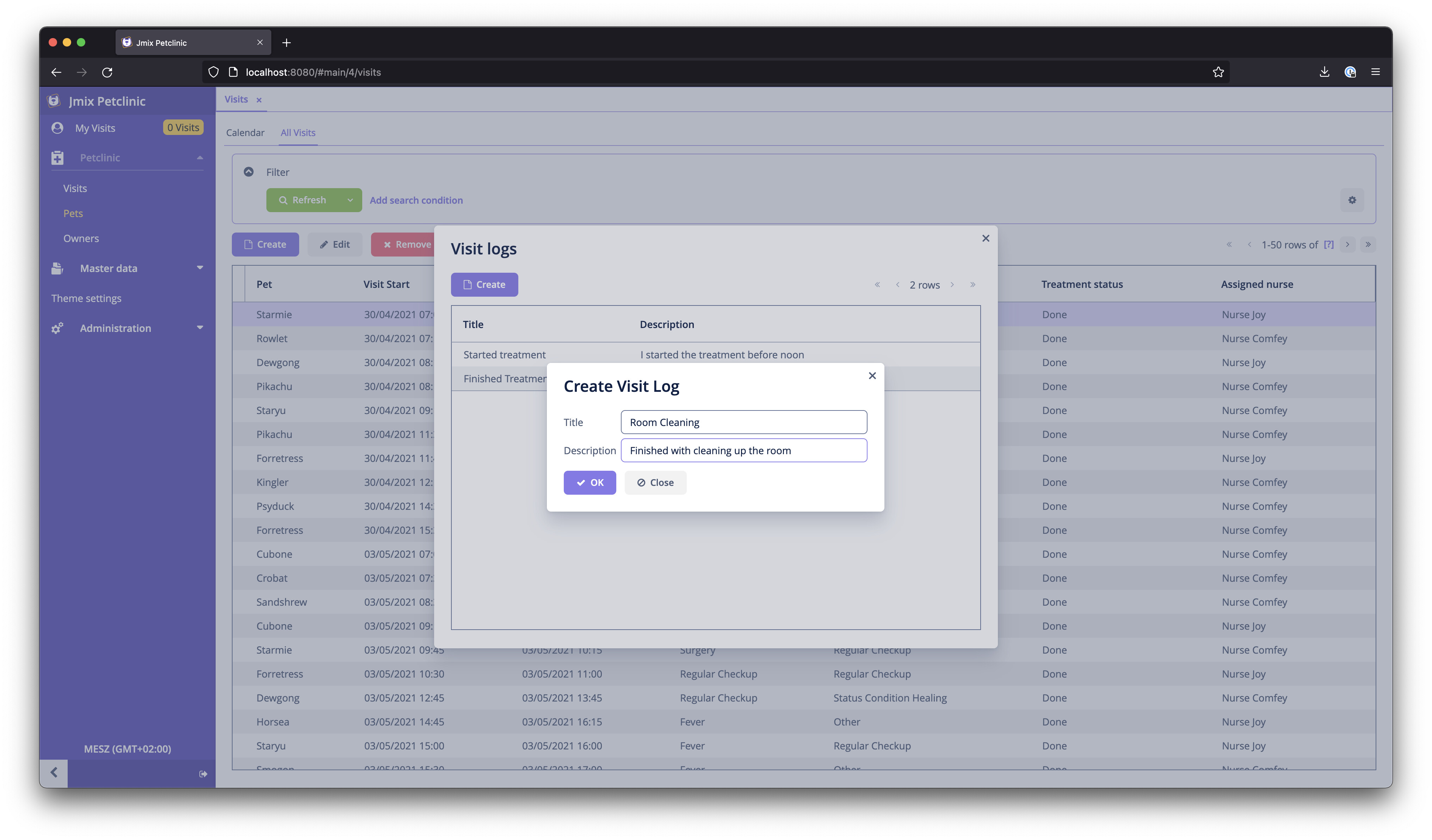
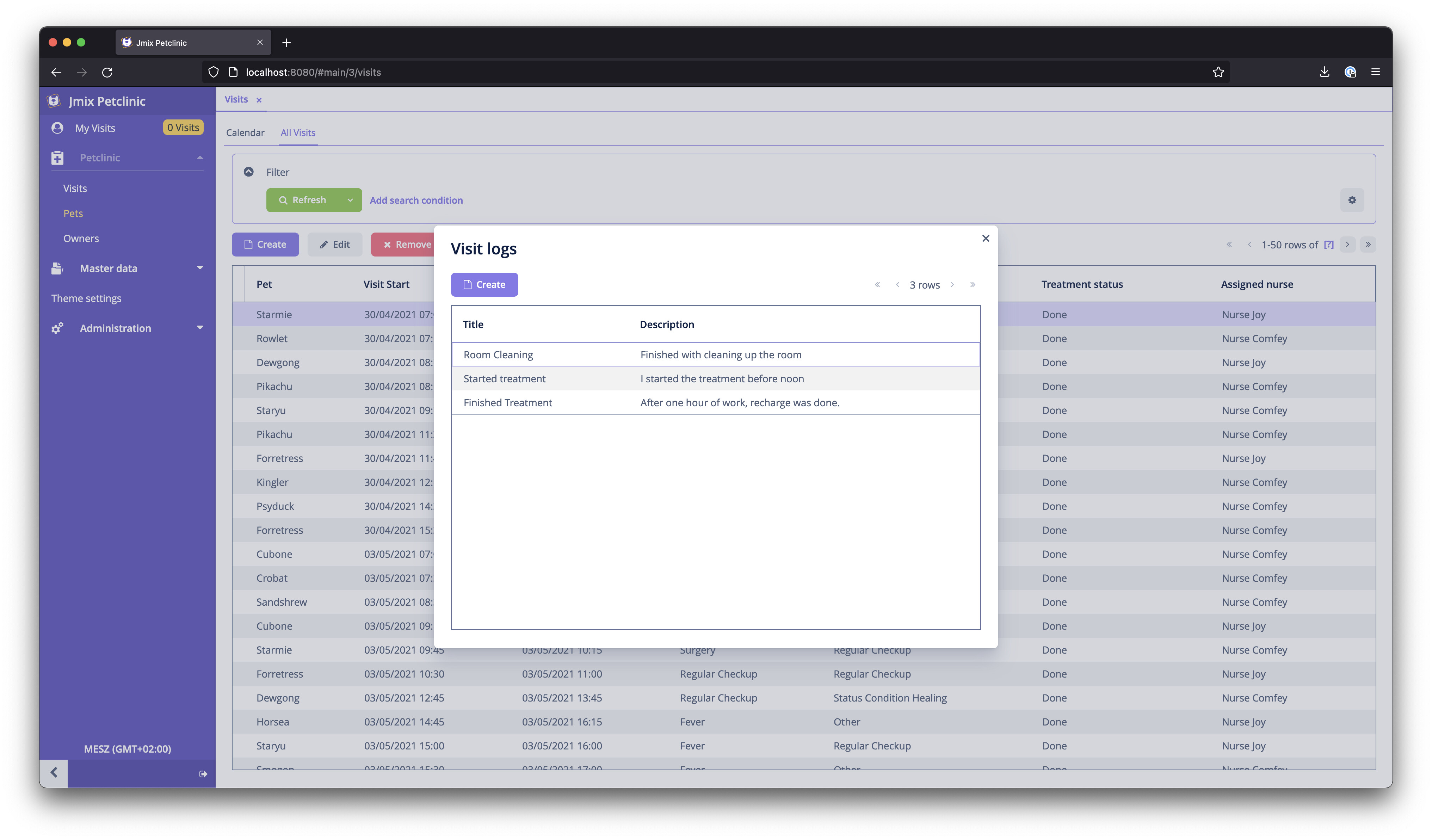
When creating the Visit Log Entries, we need change the way it is stored. For that we can use the commit delegate handler:
@UiController("petclinic_VisitLog.edit")
@UiDescriptor("visit-log-edit.xml")
@EditedEntityContainer("visitLogDc")
public class VisitLogEdit extends StandardEditor<VisitLog> {

    @Autowired
    VisitLogService visitLogService;

    @Install(target = Target.DATA_CONTEXT)
    private Set<Object> commitDelegate(SaveContext saveContext) {
        visitLogService.saveLogEntry(getEditedEntity());
        return Set.of(getEditedEntity());
    }
}
The actual storage is done by the VisitLogService once again.
I hope this helps to see how the integration with DynamoDB is possible.
Cheers
Mario