
Jmix 2.8.0 war issue

Hi everyone, today i upgrade the build.gradle with jmix 2.8.0. i got an issue when building the war file. i got this
FAILURE: Build failed with an exception.

  • What went wrong:
    Execution failed for task ‘:vaadinBuildFrontend’.

Vite process exited with non-zero exit code.
Stderr: 'vite v6.4.1 building for production…
transforming…
node_modules/@types/babel__traverse/index.d.ts(1455,40): error TS1005: ‘?’ expected.
node_modules/@types/babel__traverse/index.d.ts(1463,42): error TS1005: ‘?’ expected.
tsconfig.json(13,15): error TS6046: Argument for ‘–target’ option must be: ‘es3’, ‘es5’, ‘es6’, ‘es2015’, ‘es2016’, ‘es2017’, ‘es2018’, ‘es2019’, ‘es2020’, ‘es2021’, ‘esnext’.
tsconfig.json(14,25): error TS6046: Argument for ‘–moduleResolution’ option must be: ‘node’, ‘classic’, ‘node12’, ‘nodenext’.

i try chang the “target” in tsconfig.json but it returns to “es2022” automatically. What am i missing? Thanks
Hi Federico,

Try to delete node_modules directory, as well as package.json, package-lock.json, tsconfig.json, types.d.ts and other json and ts files in the root directory before running the build.

i think i spotted the problem if I i run “./gradlew assemble” it works, if i run “./gradlew -Pvaadin.productionMode=true bootWar”, as i was doing before, i got the error.

EDIT. the .war i generated is not for production but if i add " -Pvaadin.productionMode=true" i got the same error

Have you tried to remove the generated files, as I suggested?
Also, run ./gradlew clean or remove the build dir manually.

yes i tried to remove all .ts, .json and node_modules files. I removed the build directory and run “./gradlew -Pvaadin.productionMode=true bootWar” but still the same error. it’s the -Pvaadin.productionMode=true parameter that breaks something.

Hello,

Can you try something? I noticed some difference with the quote (") usage. I think it should be like this
“-Pvaadin.productionMode=true”:
./gradlew "-Pvaadin.productionMode=true" bootWar

I don’t use bootWar target, but bootJar, like this:
./gradlew "-Pvaadin.productionMode=true" bootJar

Kind regards,
Mladen

Hi i tried both ways, still nothing. It’s only when I add that parameter that it doesn’t work for me.

npm install -D typescript@latest
./gradlew "-Pvaadin.productionMode=true" bootWar

https://docs.jmix.io/jmix/deployment/basic.html#bootWar

Check that your build.gradle is set as described here, maybe it was overwritten during the upgrade.

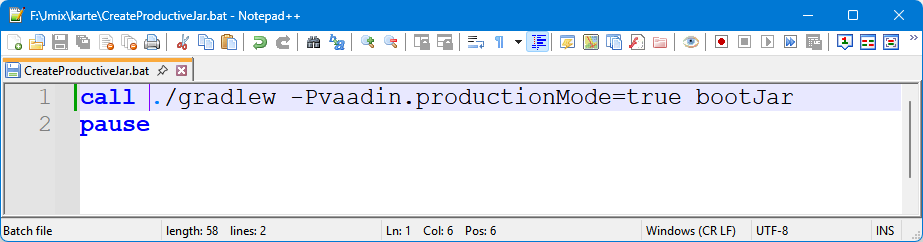
I have with Windows 11 a bat file

grafik

call ./gradlew -Pvaadin.productionMode=true bootJar

Which is actually running fine with 2.8

You still have problems ?

Hi,

As an option try to remove src/main/bundles. Also if vaadin.pnpm.enable = true property is set in application.properties, remove it.

Regards,
Gleb

Also, could you check if it happens only with the existing project or with any?