How to solve ?
Plugin ‘Jmix’ (version ‘3.1.0-262’) is not compatible with the current version of the IDE, because it requires build 262.* or older but the current build is IU-263.7307.200
How to solve ?
Plugin ‘Jmix’ (version ‘3.1.0-262’) is not compatible with the current version of the IDE, because it requires build 262.* or older but the current build is IU-263.7307.200
Hi,
Unfortunately, there is no Jmix plugin build compatible with IntelliJ IDEA 2026.3 yet. We are working on it and expect to release a compatible version in the coming days.
We’ll post an update in this thread once the new plugin version is available.
Regards,
Alexander
Did you upgrade your IntelliJ IDEA to 2026.3 recently?
Jmix studio plugin 3.1.0-262 does not work on 2026.3.
It will most likely in few days, Jmix Studio and in general IntelliJ plugins need time to catch up with the changes when a new version of IntelliJ IDEA is released.
As time goes by, older versions of the Jmix plugin, and platform versions are also not working on the new IntelliJ version, so I keep several versions of IntelliJ that are used to maintain various projects. When I will be upgrading to 2026.3 , I will not upgrade it, but install it as a separate instance, that way I can see what works for me.
Kind regards,
Mladen
Thank you both for the quick replies!
I’m a little surprised that JetBrains didn’t announce the new release sooner.
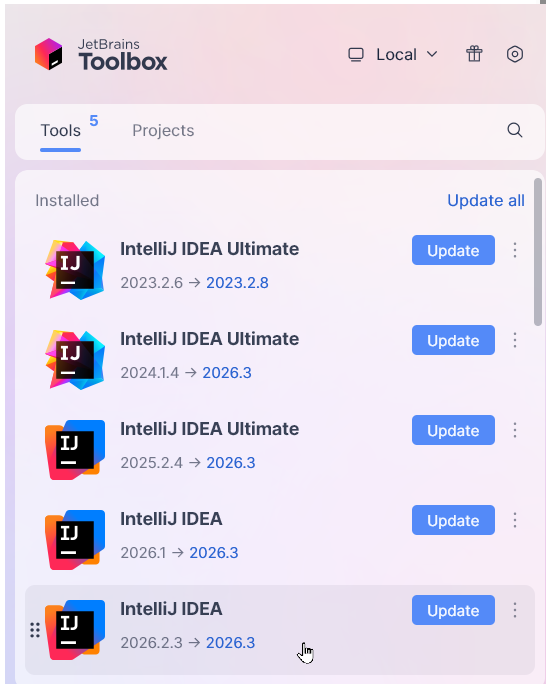
As for Toolbox, it doesn’t seem to work on my Debian 13 system with GNOME—no tools are visible.
I’d anticipated this issue and wanted to give others a heads-up so they wouldn’t get stuck recovering.
Best regards
Felix
To install Toolbox on Linux and get IDEA 2026.2 running next to 2026.3:
Download the Linux tarball from jetbrains.com/toolbox-app.
Extract and run it:
bash
   tar -xzf jetbrains-toolbox-*.tar.gz
   cd jetbrains-toolbox-*/
   ./bin/jetbrains-toolbox    # on older builds the binary sits at ./jetbrains-toolbox
On first run it installs itself under ~/.local/share/JetBrains/Toolbox, adds a desktop entry and autostart, and the extracted folder can be deleted.
3. Sign in with your JetBrains account so the Ultimate licence is picked up.
4. Install 2026.2: find IntelliJ IDEA Ultimate in the list, open the dropdown or ⋮ menu next to Install, choose “Other versions”, and pick the latest 2026.2.x.
5. Stop it auto-updating: open that IDE’s ⋮ → Settings and turn off automatic updates, otherwise Toolbox will move it to 2026.3.
If the binary fails to start on an older Toolbox build with a FUSE error, install libfuse2 (sudo apt install libfuse2 on Debian/Ubuntu).
Each IDE version keeps its own config and plugins in ~/.config/JetBrains/IntelliJIdea2026.2 and ~/.local/share/JetBrains/IntelliJIdea2026.2. If you were on 2026.2 before upgrading, those directories probably still exist, so the -262 Jmix plugin and your settings should be picked up as they were.
Toolbox won’t manage your existing 2026.3 install if it came from snap or a manual tarball. The two will coexist without problems, but you’ll update that one the way you did before.
It works on GNOME, with one catch: Toolbox is a tray application and stock GNOME has no system tray.
Without a tray: launching “JetBrains Toolbox” from the Activities overview opens its window, so you can use it that way. It just has no persistent icon to click.
With a tray: install the AppIndicator extension and the Toolbox icon appears in the top bar. On Ubuntu this is already enabled by default. On Fedora, Debian or Arch, install “AppIndicator and KStatusNotifierItem Support” from extensions.gnome.org, or via the package (gnome-shell-extension-appindicator), then log out and back in.
It runs on both Wayland and X11 sessions. The IDEs it installs get normal desktop entries, so they show up in the overview like any other app and you don’t need Toolbox open to launch them.
Kind regards,
Mladen
Hi,
Jmix plugin version 3.1.0-263, compatible with IntelliJ IDEA 2026.3, is now available on JetBrains Marketplace.